Worklist Items
Selecting the "Worklist Items" menu entry opens a page displaying a table containing all unfinished worklist entries across all credentials.
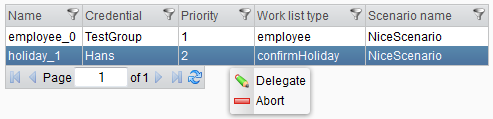
The table features a context menu with the following options:
- Delegate
- Abort
Choosing the Abort option will mark the worklist item as finished due to failure, with the accompanying error description: "Administrator aborted item".
When selecting the Delegate option, a new dialog will open, as shown in the following image.

In the dialog, you can select the new credential that will take over the item and click Save to complete the delegation. If you prefer to complete the item yourself, simply select your username from the list.